Screen and Video to Text app icon TREVINIUMSCREEN & VIDEO TO TEXT Coming soon
Screen and Video to Text · Android

You saw it.You heard it.Now it's text.

Two small floating buttons that sit on top of any app. One turns the sound of the video you're watching into text. The other copies every word on your screen, even words the app won't let you select.

One-time purchase 100% offline No subscription No account
Coming soonGoogle Play
Android 10 and newer
The 30-second commercial
12:30▾ ▮
Text is copiedSaved to History
@citynotes
The best moments happen when you least expect them.
♡ 24.8K   ↗ Share
Try it right here

Tap a button.
Watch the words land.

This is how it works on your phone. The two buttons float over whatever you're watching. Tap one and the words go straight to your clipboard.

Clipboardempty
Tap a button to see what gets copied.
COPYSHAREDELETE
What it does

Two buttons. Every word.

A small two-button strip floats at the edge of your screen, over any app. Drag it anywhere and it tucks itself against the side.

BUTTON 01 · THE SOUND WAVE

Hear the video.
Get the words.

Tap it while a video plays. It listens to the sound your phone is playing, not the room, and turns the speech into clean text.

  • Real sentences, with punctuation and capitals
  • Transcribes as it listens, so the text is ready the moment you stop
  • Up to 10 minutes per clip; at the limit it stops and transcribes by itself
  • Lands on your clipboard and saves to History
BUTTON 02 · THE T

See the text.
Copy it.

Tap it and every word visible on your screen is read and copied, from any app, any picture, any paused video.

  • Captions burned into video, text in photos, screenshots, memes
  • Apps that block long-press and copy
  • One tap: no cropping, no switching apps
  • Leaves out the phone's own buttons and bars, so the text comes out clean
The real app

Tap. Copy. Keep it all.

Screens from the actual Android build.
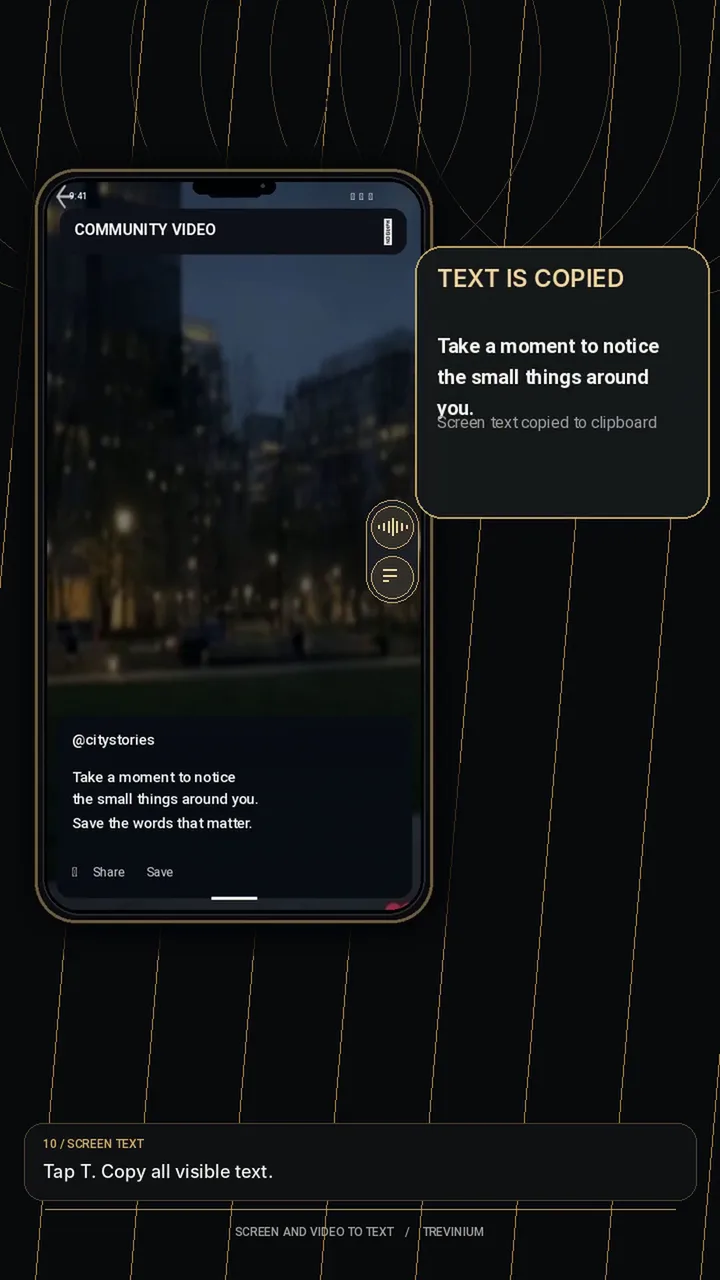
Real app: text from a video copied with one tap

01Screen text, copied

Tap T and a small note confirms every visible word is on your clipboard.
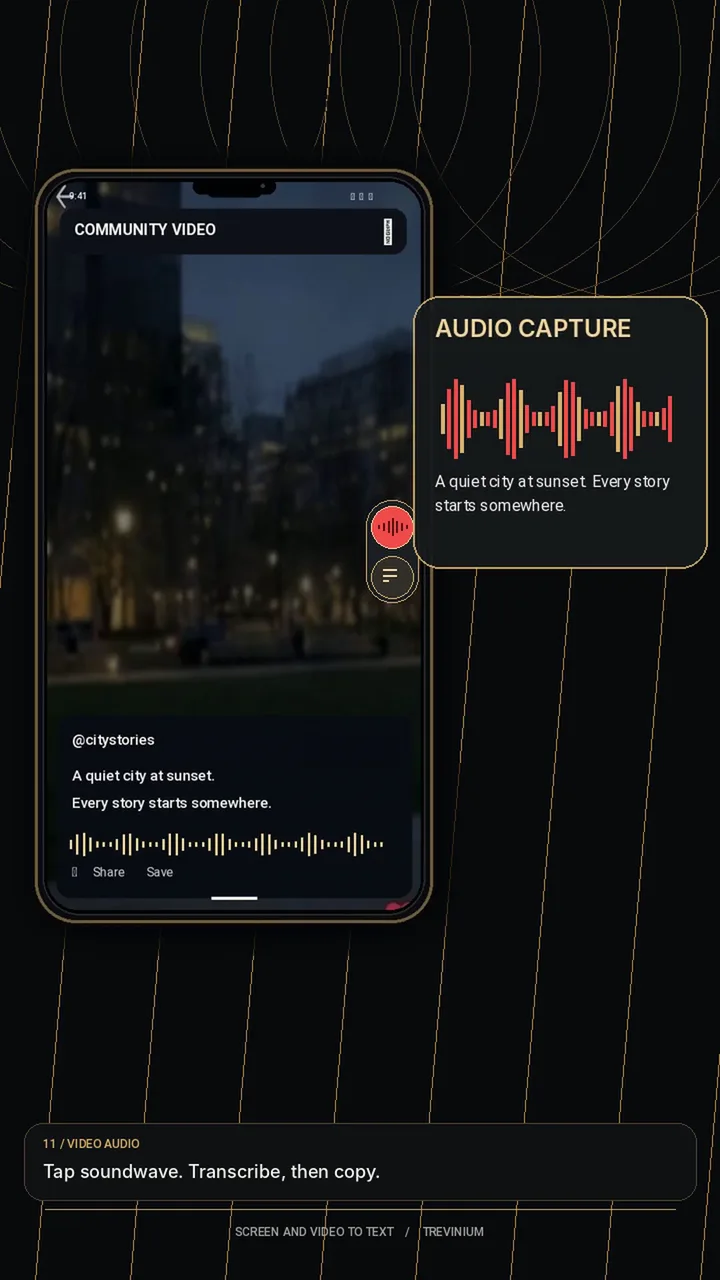
Real app: capturing the audio of a playing video

02Video speech, captured

Tap the sound wave, let it play, tap again. The transcript is ready.
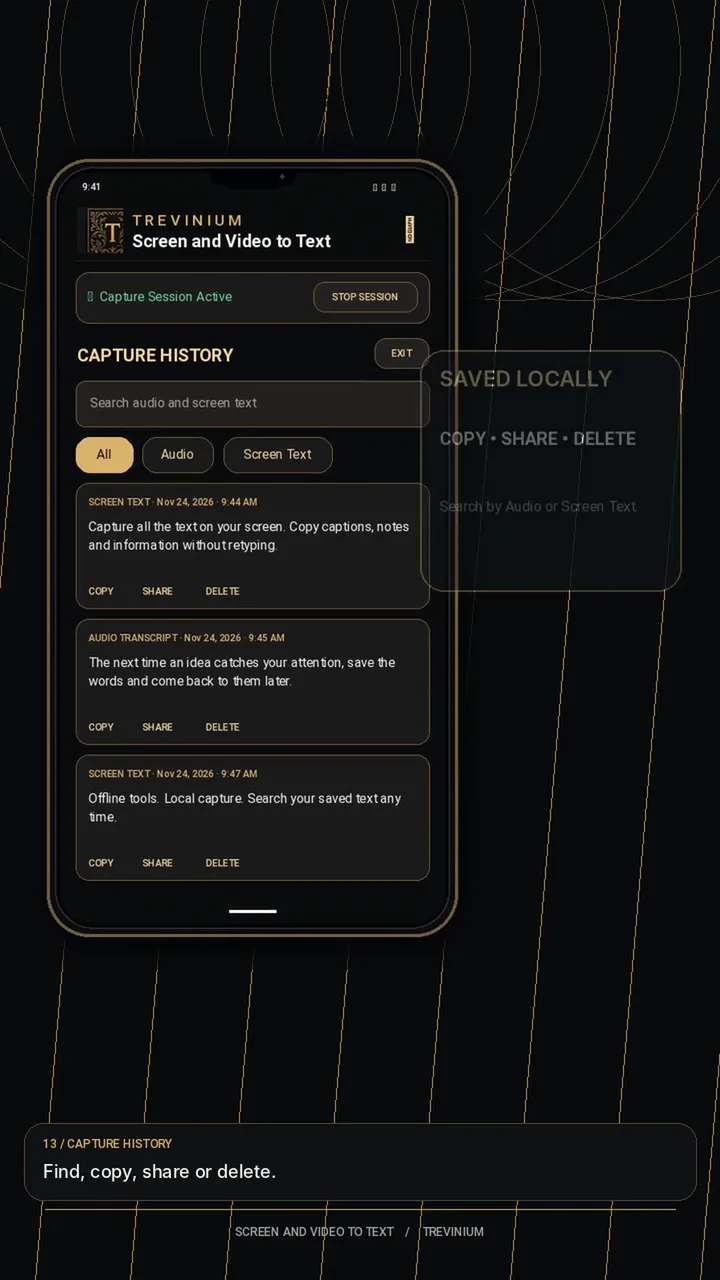
Real app: Capture History with search and filters

03Everything saved

History keeps every capture. Search it, filter it, then copy, share or delete.

The deal

Buy it once.
Use it offline. Forever.

No monthly fee. No account. No internet. The speech recognition and text reading run on your phone's own processor, so it works in airplane mode, and your words never leave your hands.

One-time purchasePay once and it's yours. No subscription, no upsells, no "pro" tier.
All offlineThe app doesn't even have permission to use the internet. It can't upload anything.
Totally privateNo sign-up, no ads, no tracking. Your History stays on your phone.
Watch it work

See it in action.

The quick tour · 33 seconds
First install, step by step · 1 minute
Why it's different

There's nothing else like it.

Other apps do a piece of this. One transcribes. One reads text out of a picture. One gives you a floating button. Most of them want the internet, an account, or a monthly fee.

We looked, and we couldn't find a single app that does all of it, in one place, completely offline. So we built it.

Who it's for

Anyone who ever paused a video to write something down.

Students turning lectures into notes Journalists pulling exact quotes Creators grabbing scripts and captions Cooks saving recipes from reels Researchers keeping sources private Anyone copying an address from a photo Language learners saving what was said Everyone who hates retyping
Good to know

Questions, answered.

Does it really work with no internet?

Yes. The app has no internet permission at all. Speech recognition and text reading run on your phone, so it works in airplane mode.

Is it a subscription?

No. It's a one-time purchase. Buy it once and it's yours.

Which phones does it work on?

Android 10 and newer. Capturing the sound that other apps play needs Android 10 or later.

What languages does it understand?

Speech-to-text understands English. The T button reads the words shown on your screen.

How long can a clip be?

Up to 10 minutes per clip. At the limit it stops and transcribes automatically. For longer videos, start another clip.

Why does Android ask permission every time?

Android asks before any app can see your screen, at the start of every session. That's Android protecting your privacy, and no app can skip it.

What if an app blocks its sound?

A few apps don't allow their audio to be captured. Turn on Microphone fallback and it listens through the mic for those.

How do I turn it off?

Drag the buttons onto the X, tap Stop in History, or use the notification. Your saved captures stay.

Screen and Video to Text app icon

Coming soon to Android.

Two buttons. Every word. One-time purchase, 100% offline. Screen and Video to Text is on its way to Google Play.

Coming soonGoogle Play


TREVINIUM logo: the ornate gold T plaque above the word TREVINIUM
SCREEN AND VIDEO TO TEXT
TREVINIUM logoTREVINIUM